
PDFVault

Form SS-5 · Application for a Social Security Card

Fill out SS-5 Form Online in 2026

Apply for a new, replacement or corrected Social Security card. Fill in the official SS-5 online, sign it, and download a ready-to-print PDF in minutes.

No account needed to start. You only enter your email when you download.

PDFVault is an independent online PDF editor. We are not affiliated with, endorsed by, or acting on behalf of the Social Security Administration or any government agency. You can download this form for free from ssa.gov.

Start for $0.99 for 7 days, then $39.99 per month unless you cancel. The fee is for PDFVault's editing and download tools, not for the government form, which is free from the issuing agency.

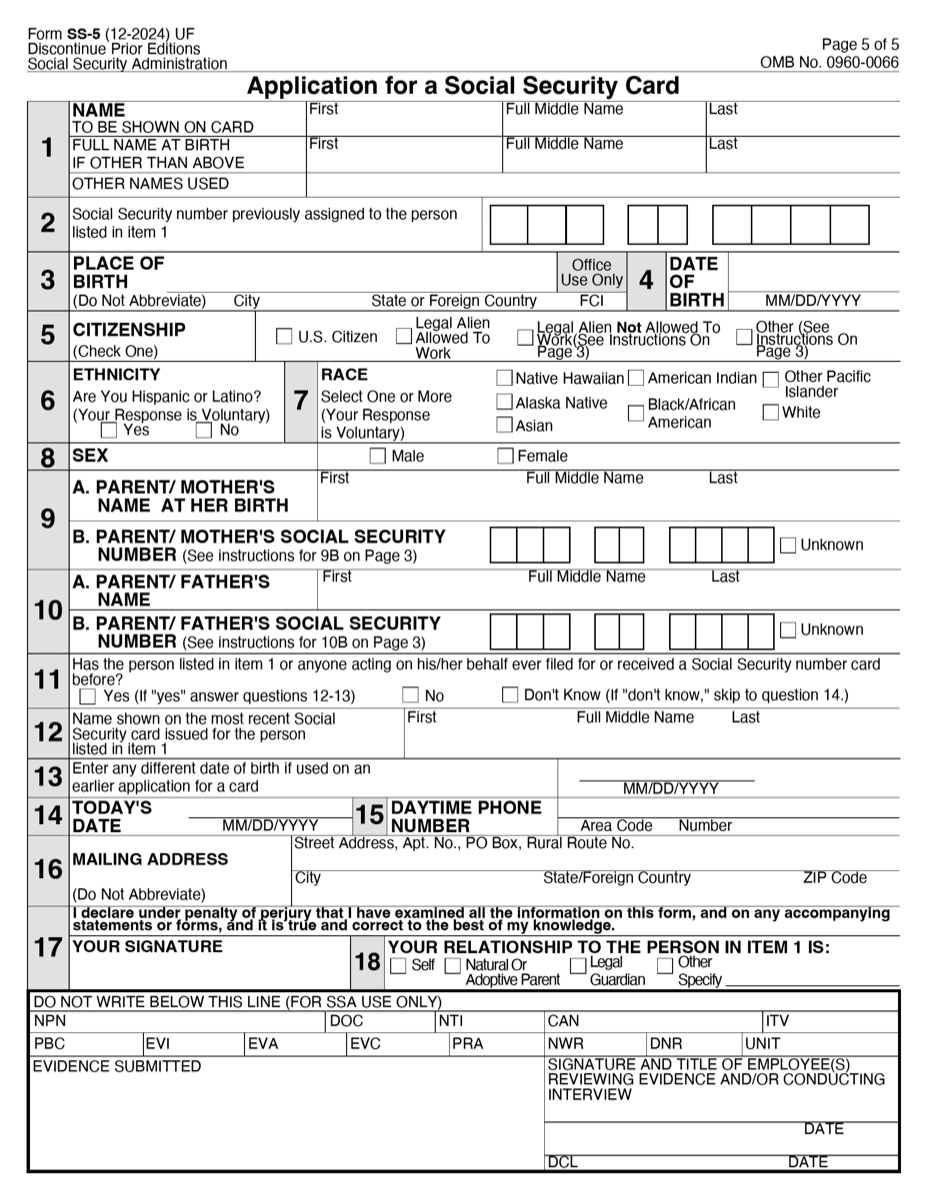
Preview of Form SS-5, the Application for a Social Security Card

Get your form

We use the latest official version of this form. It opens ready to fill — every page, field and checkbox from the original PDF.

Form
Form SS-5
Issued by
Social Security Administration (SSA)
Version
12/2024
Pages
5
Fillable online
Yes
Sign online
Yes

How to fill out Form SS-5 online

  1. 1

    Open

    Click Get Form. The official blank form opens in our editor — nothing to download or upload.

  2. 2

    Fill

    Type into the fields, tick the checkboxes and add your signature right on the form.

  3. 3

    Download

    Click Download, enter your email and get a completed PDF ready to print, mail or submit.

What is Form SS-5?

Form SS-5 is the Social Security Administration's application for a Social Security card. You use the same form for a first card, a replacement card, and to change or correct the information on your Social Security record.

The PDF has five pages: four pages of instructions and one page you fill in. Applying for a card is free from the SSA — you pay nothing to the government for the card itself.

Who needs Form SS-5

  • Anyone applying for an original Social Security card
  • Anyone replacing a lost, stolen or damaged card
  • Anyone changing their name, citizenship status or date of birth on their Social Security record
  • Parents or guardians applying on behalf of a child

Form SS-5 instructions

  1. 1

    Enter your name (item 1)

    Write the name you want printed on the card, your full name at birth if it is different, and any other names you have used.

  2. 2

    Add your number, birth details and citizenship (items 2–8)

    Enter any Social Security number already assigned to you, your place and date of birth, and your citizenship. Ethnicity and race are voluntary.

  3. 3

    Add your parents' details (items 9–10)

    Give each parent's name and Social Security number if you know them. Tick Unknown if you do not.

  4. 4

    Answer the earlier-card questions (items 11–13)

    Say whether a card was applied for before and, if so, the name on the most recent card and any different date of birth used.

  5. 5

    Add contact details, sign and date (items 14–18)

    Enter today's date, your phone number and your mailing address, then sign item 17 and tick your relationship to the person in item 1.

Where to submit Form SS-5

Many adults can request a replacement card online through a my Social Security account. Otherwise, mail or take the completed form to your local Social Security office or card center together with original documents proving your identity — the SSA does not accept photocopies or notarized copies.

If you are 12 or older and have never had a Social Security number, you must apply in person. Replacement cards are limited to three per year and ten in a lifetime, with some exceptions.

Frequently Asked Questions

Ready to fill out Form SS-5?

Open the official form, fill it in, and download your completed PDF in minutes.

PDFVault is an independent online PDF editor. We are not affiliated with, endorsed by, or acting on behalf of the Social Security Administration or any government agency. You can download this form for free from ssa.gov.

Start for $0.99 for 7 days, then $39.99 per month unless you cancel. The fee is for PDFVault's editing and download tools, not for the government form, which is free from the issuing agency.

This page is general information, not legal or tax advice. Always check the official instructions before submitting. Official PDF