
W-9 Form
Content last updated: August 31, 2026
Get a W-9 ready to send in minutes
Whether you're a freelancer sending your Taxpayer Identification Number (TIN) to a new client or a company collecting one from a vendor, PDFVault gives you a ready-to-fill W-9 — no printing, scanning, or hunting for a template on the IRS site.
No account needed to start. Sign in only when you're ready to save or download.
This website is not affiliated with the IRS
What is Form W-9?
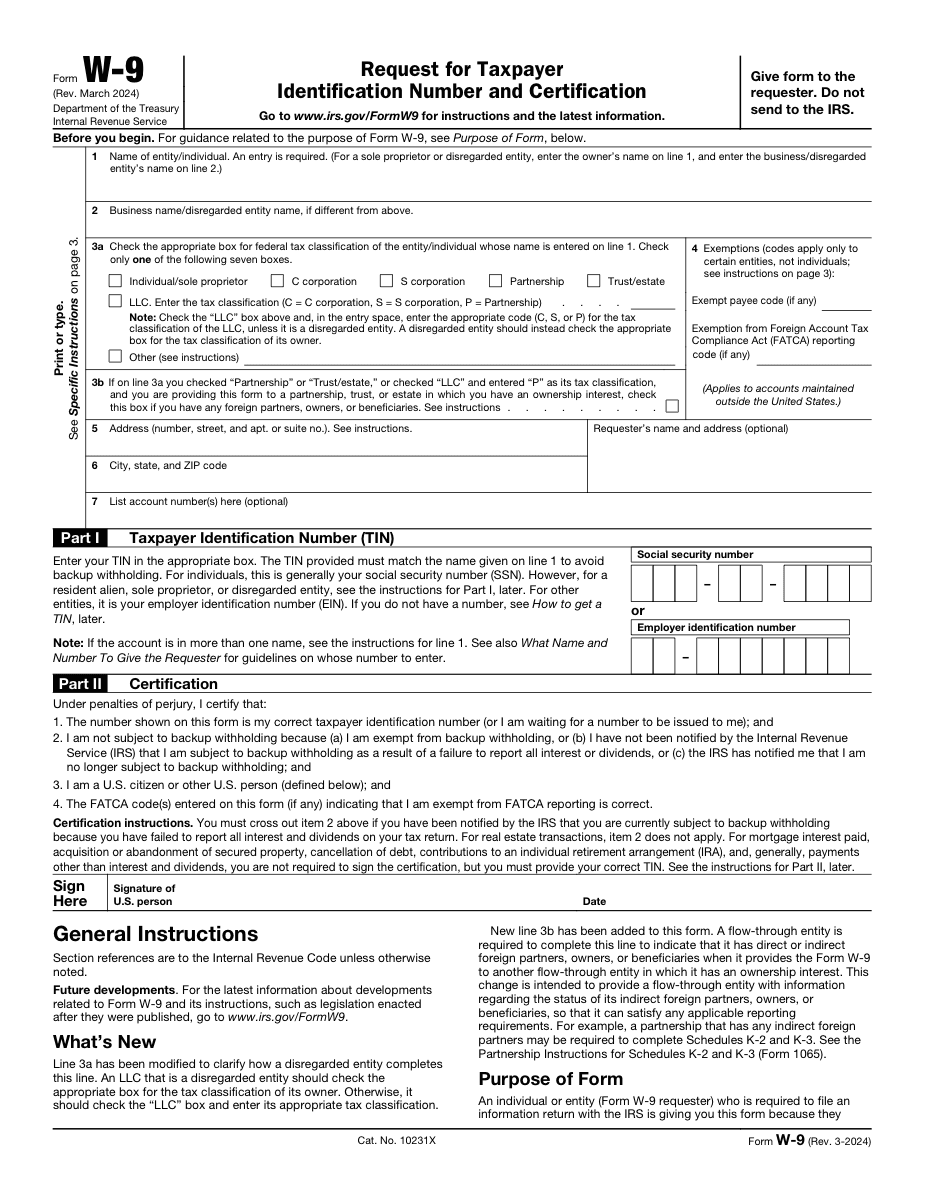
Form W-9, Request for TIN and Certification, is a short IRS form that lets a U.S. taxpayer share their TIN with a business or individual that pays them. The company or person requesting it — the “payer” — uses that information to prepare year-end reporting forms like the 1099-NEC.
You'll typically be asked for a W-9 in these cases:
- You start freelance or contract work for a U.S. business
- You open certain financial or investment accounts
- You receive rent, royalty, or other reportable payments
- You are onboarded as a vendor or supplier
Unlike a tax return, a W-9 isn't sent to the IRS. It stays with the person who requested it, as a record they'll use when filing their own paperwork.
Do you need to fill one out?
You probably need to fill one out if:
- You are a freelancer or independent contractor invoicing a U.S. business
- You are a sole proprietor, LLC, partnership, or corporation being paid by a client or platform
- You are a landlord, vendor, or account holder that a company needs to report payments to
You likely don't need to fill one out if:
- You are a W-2 employee (your employer uses Form W-4 instead)
- You are a non-U.S. person with no U.S. tax reporting obligation — a W-8BEN or W-8BEN-E is usually the correct form instead
- You are not currently paid by or contracted with the entity requesting it
There's no fixed filing deadline for a W-9 — you complete it whenever a payer asks for it, ideally before your first payment so nothing holds up their reporting.
What you'll need before you start
Gather these details ahead of time so you can fill out the form in one pass:
Identity
- Your legal name, exactly as it appears on your tax return
- A business or “doing business as” (DBA) name, if you use one
- Your federal tax classification (Individual/Sole Proprietor, LLC, C Corp, S Corp, Partnership, or Trust/Estate)
Address & Taxpayer ID
- The mailing address where you'd like to receive tax documents like a 1099
- Your Social Security Number (SSN — individuals) or Employer Identification Number (EIN — businesses)
Certification
- Any applicable exemption codes (most individuals leave this blank)
- Your signature and the date, confirming everything above is accurate
How to fill out a W-9 in PDFVault
- 1
Step 1. Load the template.
Open the W-9 straight from our editor — it's already formatted and field-ready.
- 2
Step 2. Enter your identity details.
Type your legal name, business name (if any), and select your tax classification from the checklist.
- 3
Step 3. Add your address and TIN.
Fill in your mailing address, then enter your SSN or EIN in the taxpayer ID section.
- 4
Step 4. Apply exemption codes, if they apply to you.
Most people can skip this section entirely.
- 5
Step 5. Sign electronically.
Use PDFVault's signature tool to sign and date the certification section.
- 6
Step 6. Download your PDF.
Export a clean, print-ready copy to send to whoever requested it.
Signing and sending your completed form
Once your details are filled in, add your signature using PDFVault's built-in signing tool — just draw, type, or upload one, then drop it into place. There's no need to print the form just to sign it.
When you're done, send the PDF directly to the person or business that asked for it (a client, HR contact, or accounts payable team, for example). You don't file a W-9 with the IRS yourself — the payer keeps it on file for their own reporting.
Double-check every field before sending. An incorrect TIN or name mismatch can delay payments or trigger backup withholding.
Frequently Asked Questions
Fill out your W-9 now
Your W-9 template is preloaded, editable, and ready to sign — no downloads or extra software required.
Disclaimer: This page is provided for general informational purposes only and does not constitute tax, legal, or accounting advice. Tax rules can change and may vary based on your individual circumstances — consult a qualified tax professional or the IRS for guidance specific to your situation.